Subscribe
Who can do this: Administrator
A PinkTower subscription runs for one year. You can pay for the whole year at once, or pay monthly. You can subscribe during your free trial, after it has ended, or after a previous subscription has ended.
Your price depends on how many children are enrolled at your school. The Subscription page works it out for you and shows your own price before you commit. There is no price list to read.
Subscribe
- Open Subscription in the sidebar.
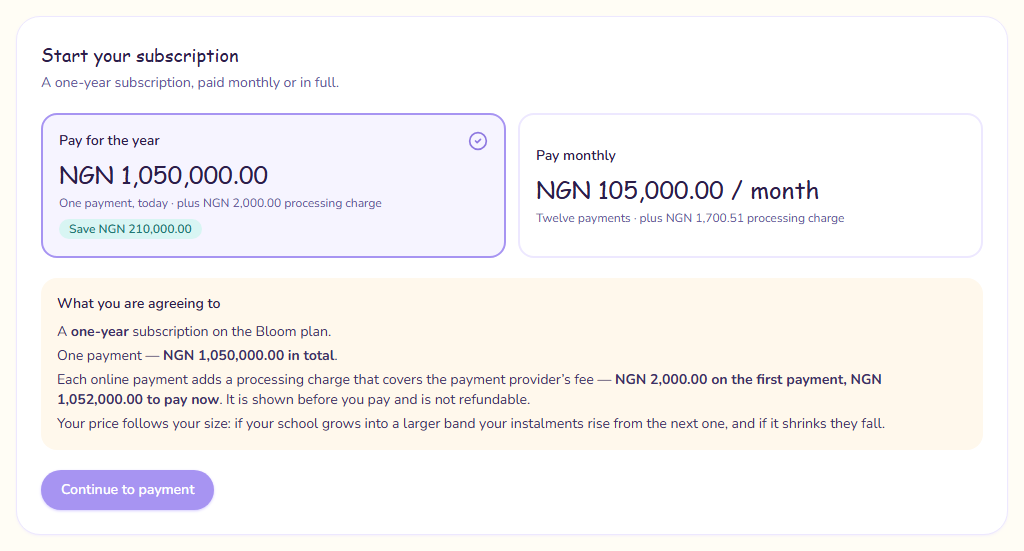
- Under Start your subscription, choose Pay for the year (one payment, today, with the saving shown in money) or Pay monthly (twelve payments).
- Read What you are agreeing to. It sets out the whole commitment: a one-year subscription on your plan, the number and size of the payments, and the total. It also shows the processing charge added to each online payment.
- Press Continue to payment. Your school's Order Form opens.
- Read the Order Form. It sets out your school's legal details, the plan, start date and one-year term, renewal, fees and how often you are billed, payment terms, support, and contacts on both sides.
- Enter your Full name and Job title.
- Tick I am authorised to sign on behalf of your institution, and I accept this Order Form under the PinkTower Institution SaaS Agreement.
- Press Sign and continue to payment.
- Check Confirm your payment: the Subscription amount, any Tax, the Processing charge and the Total to pay now.
- Press Pay. Paystack's secure payment window opens.
- Pay by card or bank transfer.
When you come back, the page shows Confirming your payment for a few seconds, then your school becomes Active.
The processing charge
Each online payment adds a processing charge that covers the payment provider's fee. It is shown before you pay and is not refundable.
Your price follows your size
If your school grows into a larger size band during the year, your payments rise from the next one. If it shrinks, they fall. What you are agreeing to says this before you sign. If you paid for the whole year and grow into a larger band, you are sent an extra invoice for the difference over the months left.
The Order Form
The Order Form is Schedule 1 of the agreement you signed when you registered. If you change between yearly and monthly, the form changes too, so you sign again.
Your subscription does not start until the payment goes through. If you close Paystack's window without paying, your school stays exactly as it was. The Order Form you signed is still kept, but it is not in effect. Every Order Form you sign is listed under Signed Order Forms; see Invoices.
If the payment does not go through
- Your payment didn't go through: nothing was charged. Press Try again.
- Confirming your payment stays on screen: the payment is taking longer than usual to be confirmed. Do not pay again. If your subscription has not appeared shortly, contact PinkTower quoting the reference shown.
- Your payment needs checking by PinkTower: PinkTower has been told and will be in touch.
If your school is larger than our plans
Above a certain number of children, PinkTower agrees a price with each school individually. The page then shows Your school is larger than our published plans instead of a price, with a Contact PinkTower button. Nothing is wrong: get in touch and PinkTower will agree a price with you and set it up.
If your school is already subscribed and grows past the largest plan, the page tells you. Your current price stands for the rest of your subscription year. Contact PinkTower to agree a price before it renews.
If the page says We are still setting your price, contact PinkTower.