Closing time and late pickups
Who can do this: Administrator Teacher Parent
Set your school's closing time and PinkTower watches for children who are still waiting after it. Their parents and every administrator are told.
Nothing is checked until you set a closing time
There is no default. If your school has never set a closing time, late pickups are not detected and nobody is alerted. The teacher's pickup screen says No closing time set — late pickups are not flagged.
Set the closing time
Who can do this: Administrator
- Open Pickup in the menu.
- Press Closing time.
- Enter the School closing time, in 24-hour time.
- Press Save.
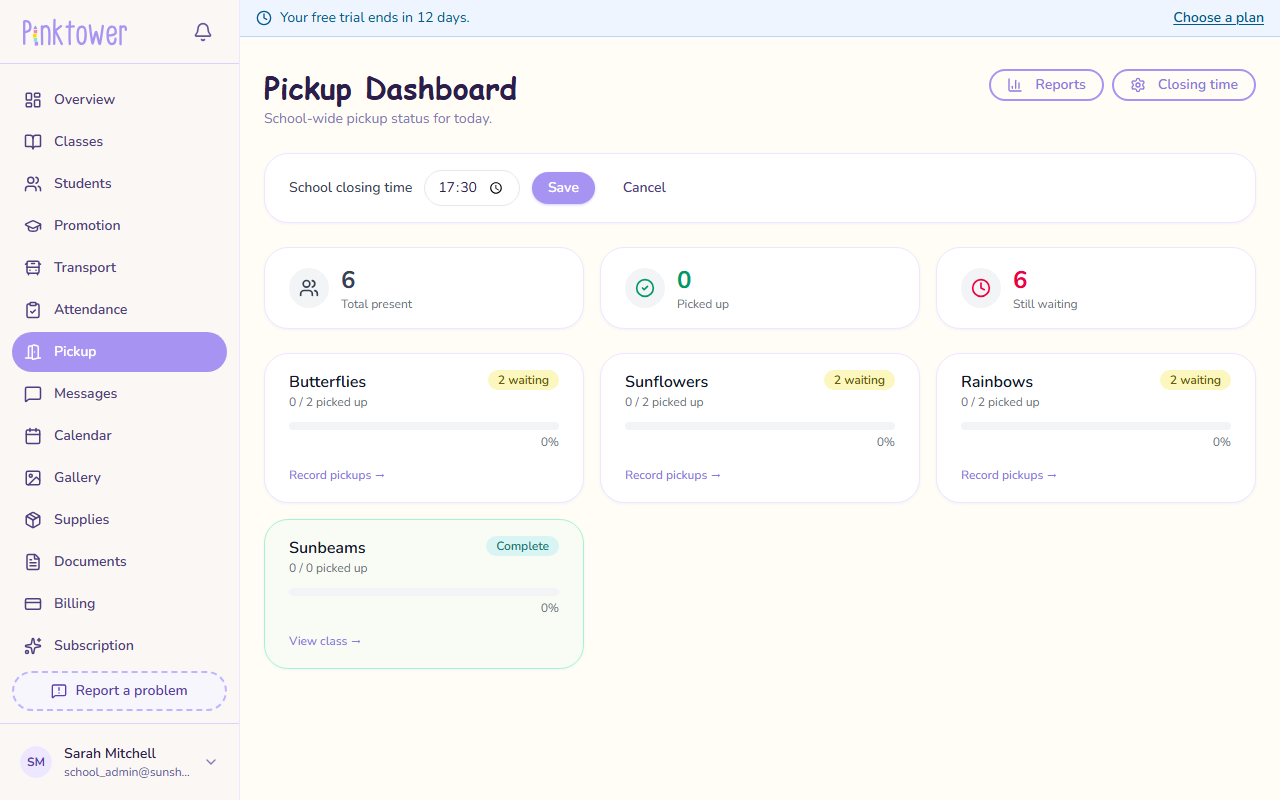
To check what is stored later, press Closing time again. The field shows the saved time.
This time is in UTC
PinkTower reads this time as UTC, not your local time. Nigeria (WAT) is one hour ahead of UTC, so subtract one hour: for 18:00 in Lagos, enter 17:00. See Times are in UTC.
When an alert is sent
- PinkTower starts looking 10 minutes after your closing time, so a parent a few minutes late is not chased.
- It keeps looking until an hour after your closing time, checking about every 10 minutes.
- Any child marked Present or Late today who has not been recorded as picked up gets an alert.
- Each child is alerted once a day, however long they wait.
- A child already recorded as picked up is never alerted. A child who got on the school bus home counts as picked up.
- No alerts are sent on a day you have added as a closure in the calendar. See Calendar, events and closures.
The alert reads Late pickup: followed by the child's name, and says the child has not yet been picked up and closing time has passed. It goes to the child's parents and to every administrator.
Record every pickup
A child who went home without their pickup being recorded still looks uncollected, and their parents will get a late-pickup alert. Recording each pickup at the door is what keeps the alerts accurate. See Record a pickup.
What teachers see
Who can do this: Teacher Administrator
The Pickup screen shows today's closing time above the class list. Ten minutes after it, a Late pickup alert banner says how many children have not been collected, and each waiting child is marked Overdue.
The screen uses your device's clock
The Overdue marking compares the closing time with the clock on your phone or computer, while the alerts to parents read it as UTC. In Nigeria, where you enter the closing time one hour earlier, the screen marks children Overdue about an hour before any alert is sent.
What parents see
Who can do this: Parent
If your child is still at school after closing time, you get a late-pickup notification. It belongs to the Attendance & pickup category, which cannot be switched off, so the school can always reach you about your child's safety.
You are also told when your child is collected, with the name of the person who collected them.