Connect your bank account
Who can do this: Administrator
Parents cannot pay fees online until you add the bank account your fees should go to. This is your school's payout account. Payments go straight from the parent to this account through Paystack, PinkTower's payment provider. PinkTower never holds your school's money.
Until it is set up, the Billing page shows Online payments are off, and parents see that the school hasn't set up online payments yet.
Add your payout account
- Open Billing in the sidebar.
- Open the Payout account tab. You can also press Add bank account on the Online payments are off message.
- Under Bank, search for your bank and choose it.
- Enter the 10-digit Account number.
- Press Check account. The name the bank holds for the account appears.
- Make sure it is your school's account. If it is not, press No, change details and check the bank and number.
- Press Yes, save this account.
Every administrator at your school is emailed that the payout account was saved.
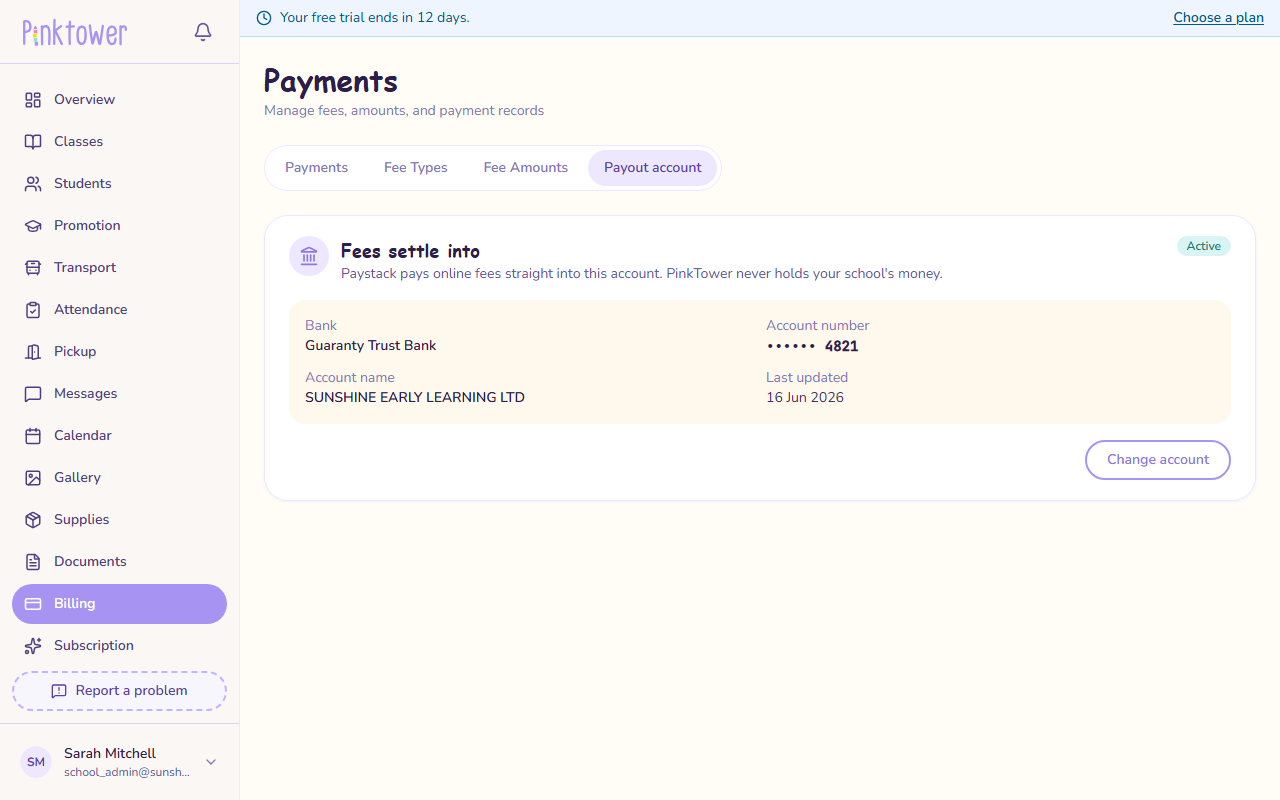
After you save
The tab then shows where Fees settle into: the bank, the last four digits of the account number, the account name and when it was last updated, with a status:
- Active: parents can pay online.
- Pending activation: Paystack has not activated the account yet. Parents can pay online once it has.
You may also see Verification pending at Paystack. Parents can pay, but Paystack may hold the money until it has checked the account. This usually takes a working day.
Paystack pays each payment into your account; by default this is the next working day.
Change the account
- Open Billing → Payout account.
- Press Change account.
- Choose the bank, enter the account number and press Check account.
- Check the name, then press Yes, save this account.
Payments made after you save go to the new account.
Every administrator is emailed when the account changes
Changing a bank account is the most common way school fees are stolen, so every administrator of your school is emailed whenever it changes. If you receive one you did not expect, contact PinkTower straight away. See Report a problem.
Good to know
- Only naira fees can be paid online. See How billing works.
- Parents pay the payment provider's fee, as a processing charge on top of the fee. Your school receives the full fee. See Pay school fees.
- Refunds to parents come out of your school's money. See Refunds.