Send someone else to collect
Who can do this: Parent Teacher Administrator
If you cannot do the school run today and nobody on your child's usual list can either, you can send someone else. PinkTower gives you a one-day code. You pass it to the person collecting, and they show it to the teacher.
The person is never added to your child's list. Anyone could turn up claiming to be the person you named. The code proves they are the one you meant.
- Open Pickup history in the menu, or press Send a pickup code on Overview.
- On the Someone else collecting today? card, press Delegate pickup.
- Under Which children?, tick the children the code should cover.
- Enter Who is collecting?: the person's name.
- Optionally enter Their phone number (optional). The teacher can check it against their ID.
- Press Generate code.
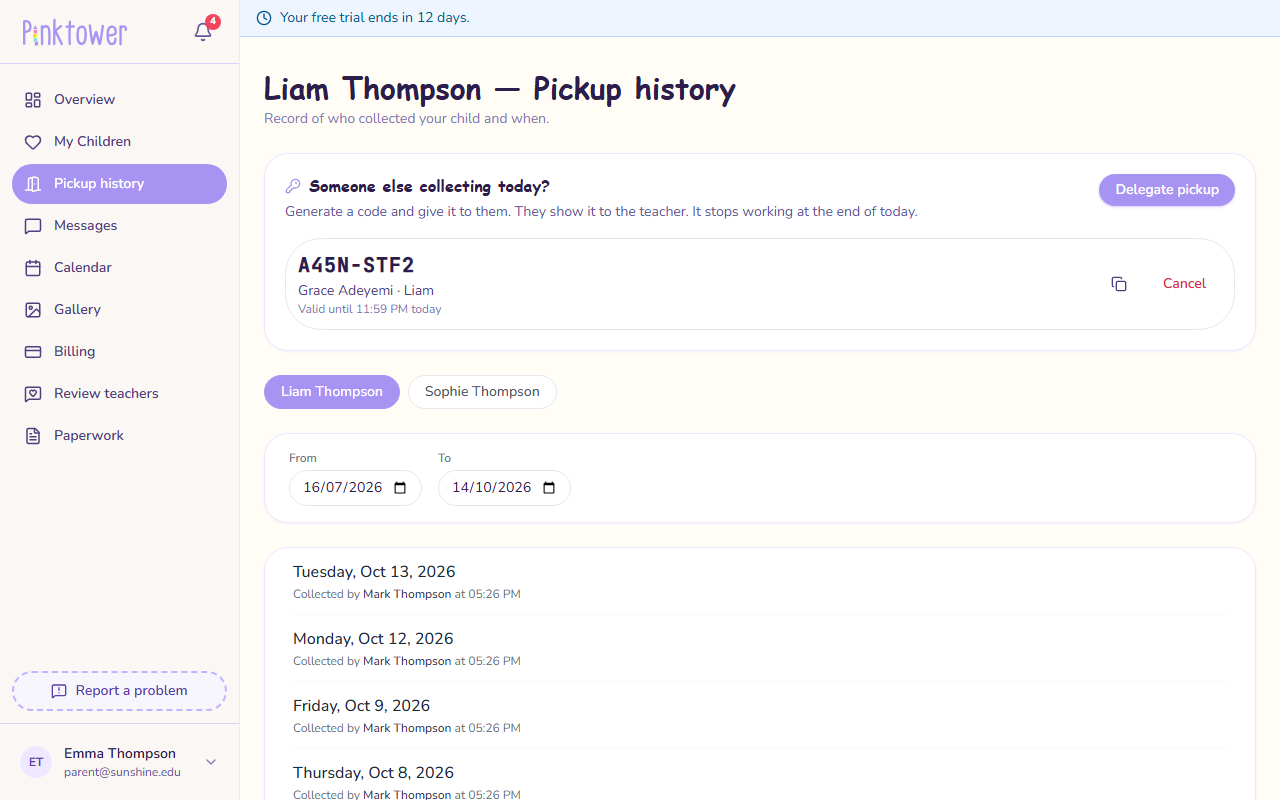
The code appears in large letters, with who it is for, which children it covers, and when it stops working (Valid until ... today). Press the copy button beside it to copy it into a message.
Give the code to the person collecting. They show it to the teacher, who types it in.
Administrators follow the same steps.
- On the pickup screen, press Record pickup on the child.
- Under Someone else with a code, type the code into Pickup code and press Check.
- Check the name, the parent who sent them, and the phone number against the person in front of you.
- Press Confirm pickup.
See Record a pickup for the full steps.
Cancel a code
If plans change, press Cancel beside the code on the Pickup history page. It stops working straight away.
A code for more than one child
A code can cover several of your children. Each child is collected separately, and the teacher enters the code once for each. A badge on the code shows progress, for example 1 of 2 collected.
A child who has already been collected today cannot be added to a code. They show Already collected today, and the Delegate pickup button is unavailable once all your children have gone home.
When a code stops working
A code works for one day only. It stops at the end of the day by UTC, which is 01:00 the next morning in Nigeria. A code made just after midnight in Nigeria still belongs to the previous UTC day, so it lasts only until 01:00. Make the code on the day it is needed, during the day.
This time is in UTC
PinkTower reads this time as UTC, not your local time. Nigeria (WAT) is one hour ahead of UTC, so subtract one hour: for 18:00 in Lagos, enter 17:00. See Times are in UTC.
A code also stops working once every child it covers has been collected, or when you cancel it.