Who can collect a child
Who can do this: Administrator Parent
A child can be released only to someone the school knows is allowed to take them. There are three ways to be allowed.
1. The child's guardians
Every guardian linked to the child can collect them. There is nothing to set up: when a parent or guardian is linked to a child, they appear on the pickup screen with their relationship (for example Mother or Guardian) and a Parent badge.
A guardian cannot be removed from the pickup list on its own. To stop someone collecting, an administrator unlinks or suspends them as the child's guardian. See Add students and guardians.
2. Extra authorised contacts
A grandparent, a childminder, a neighbour: anyone else the family wants to be able to collect. Administrators and parents can add and remove them. Teachers can see the list but not change it.
- Open Students in the menu and open the child.
- Find the Authorised for pickup card.
- Enter the person's Name.
- Enter their Relationship, for example Grandmother. This is what staff see at the gate.
- Optionally enter their Phone (optional).
- Press Add contact.
- Open My Children in the menu and open your child.
- Find the Authorised for pickup card.
- Enter the person's Name.
- Enter their Relationship, for example Grandmother. This is what staff see at the gate.
- Optionally enter their Phone (optional).
- Press Add contact.
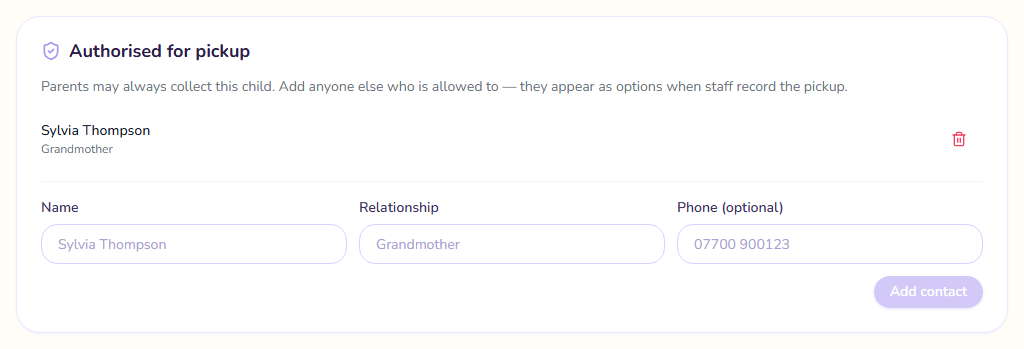
To remove someone, press the bin icon beside their name.
Contacts are added per child. If the same grandmother collects two siblings, add her to each child.
Allow a few seconds
A new contact reaches the pickup screen a few seconds after you add them. If a teacher has the pickup dialog open already, they may need to close it and open it again.
3. Someone with a one-day code
When none of the usual people can do the school run, a parent can send someone else just for today. The parent creates a code in the app and gives it to that person, who shows it at collection. The person is never added to the list. The code is what proves they are the one the parent meant. See Send someone else to collect.
If a child has nobody on the list
The pickup dialog says No authorised guardians on file yet. Without a guardian or a valid code, the pickup cannot be confirmed. An administrator should check that the child has a guardian linked.