Follow your child on the bus
Who can do this: Parent Administrator Teacher
If your child rides the school bus, you can see where they are on the journey. Everything you see is what the driver or conductor marked, standing next to your child.
There is no map and no arrival time. PinkTower does not track the bus itself.
Where your child is now
Who can do this: Parent
Open Overview. Your child's card shows their day in three steps: In, Bus and Home. The Bus step appears only for a child who rides a bus, with the bus's name beneath it.
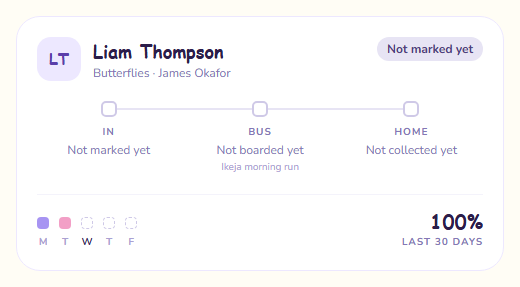
The Bus step shows one of these:
| Status | What it means |
|---|---|
| Not boarded yet | Your child has not been marked onto the bus today. |
| On bus to school | Your child got on the morning bus. |
| At school | The bus dropped your child at school. |
| On bus home | Your child got on the afternoon bus. |
| Home | The bus dropped your child off on the way home. |
| Arrival not confirmed | Your child got on the bus, shown with the time, but the crew never marked them off. |
Arrival not confirmed means the crew forgot to mark the end of the run, and PinkTower closed it later. It records that your child got on, and deliberately does not claim they arrived, because nobody saw it. Ask the school office.
Notifications
On a day your child rides both ways, you can get up to four notifications:
- Your child is on the bus to school
- Your child arrived at school
- Your child is on the bus home
- Your child arrived home
You can mute these by turning off School bus in your notification settings. Absence and late-pickup notifications are not affected, and cannot be muted. See Notifications.
Getting on the bus home counts as pickup
When your child gets on the bus home, the school records them as collected, with the bus's name in place of a person's. The Home step on your child's card shows the time and the bus's name, and your pickup history shows the bus as the collector.
- There is no separate "picked up" notification for the bus. The is on the bus home notification is the one that tells you.
- If you collected your child at the gate before the bus left, your pickup is the one that counts.
- Your child is not chased as a late pickup once they are on the bus home.
Your child must be on the register
A pickup is recorded only for a child marked Present or Late that day. If your child was not marked in, getting on the bus home does not record a pickup, and you may get a late-pickup alert. The crew see a warning when this happens.
When the bus drops your child at school in the morning, they are marked Present on the register.
The On bus tile
Who can do this: Administrator Teacher
The On bus tile on Overview shows how many children are on a bus right now, split by direction, for example 4 to school · 3 heading home. It refreshes about once a minute.
- Administrators see the whole school.
- Teachers see the children in their own class.
The split is the useful part: children still showing to school late in the morning are a sign the morning run is late, or that the crew have not marked the drop-off.