Report your own absence
Who can do this: Administrator Teacher Nurse Bus crew
Nobody clocks in. Everyone is counted as at work unless they say otherwise, so you only need to tell PinkTower about the exceptions: a day you are not coming in, or a morning you will be late.
Report that you are away or running late
- Open Staff attendance in the menu, then press Report absence or lateness. Teachers, nurses and bus crew can also press I'm away or running late on Overview.
- Check the Date. It opens on today, and you can choose a later day to report ahead.
- Under What is happening?, choose Not coming in or Running late.
- If you are running late, you can enter your Expected arrival time.
- Write a Reason. It is required, because the office needs it to arrange cover.
- Press Report.
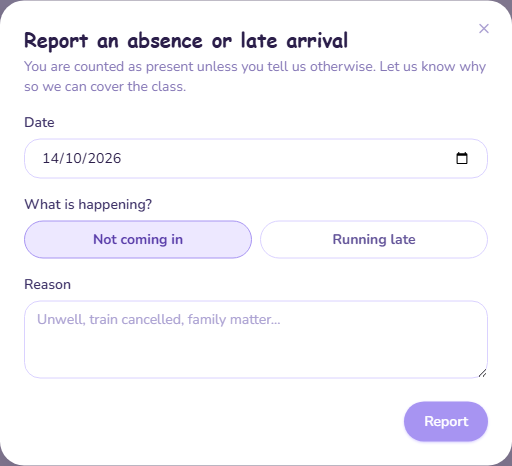
Once you have reported, the buttons read Update my report. Use it to change the details, then press Update.
When you arrive after all
There is no separate "I'm here" step. Press Update my report, then I'll be in after all. Your report is removed and you are counted as in again.
Teachers: clear your report before marking the register
You cannot save a class register on a day you have reported yourself as not coming in or running late. When you get in, clear your report first.
Teachers, nurses and bus crew see only their own report on the Staff attendance page.
See who is in today
Who can do this: Administrator
The Staff attendance · today card on Overview shows how many of your team are in, running late and away. Press See why (or See details when everyone is in) to open the full page.
On the Staff attendance page:
- Choose the Date.
- Who is in, by group shows In, Running late, Away and Team for each group.
- Below it, everyone who has reported is listed with their status, expected arrival if given, and their reason.
The groups are:
- A grade: staff assigned to a class in that grade. Someone with classes in two grades is counted once, in the earlier grade.
- Nurses: nurses are never assigned to a class, so they have their own group.
- Transport: bus drivers and conductors.
- Office: administrators, and any teacher not currently assigned to a class.
Grades with nobody in them are not shown.
Running late is not counted as in
Someone on their way is not in the building yet, so they are not in the In count. A late arrival needs ten minutes of cover. An absence needs a whole day.
Each person reports for themselves. There is no way to file a report on someone else's behalf in the app.
Days the school is closed
At the weekend the card reads Closed · weekend and expects nobody. On a closure you have added to the calendar, it names the closure instead. If you ticked Staff are still expected in (a training day) when adding the closure, the card counts staff as normal. See Calendar, events and closures.
Saturday and Sunday are always treated as closed, so a school with Saturday activities reads as closed on those days. Staff can still file a report for a weekend.