Read employee reviews
Who can do this: Administrator
Parents can review the teachers of their own children's classes (see Review your child's teachers). You read those reviews on your dashboard.
- Open Overview in the sidebar.
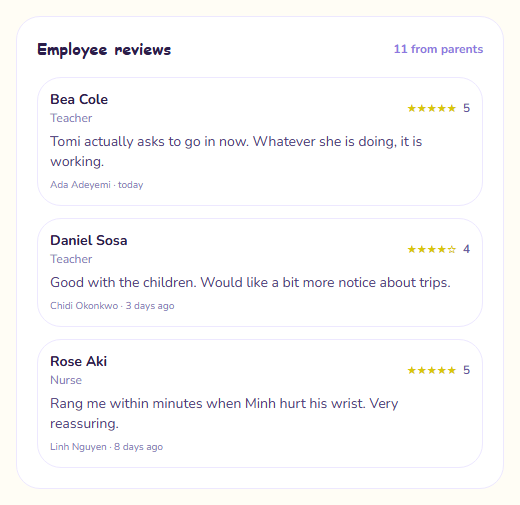
- Find the Employee reviews card.
The card shows the three newest reviews, newest first. Each one shows:
- the staff member's name and role
- the star rating, out of 5
- the parent's comment
- the parent's name, and how long ago they wrote it
The number at the top of the card, for example "12 from parents", is how many reviews PinkTower is currently keeping.
Good to know
- Each parent has one review per staff member. If a parent sends another, it replaces their earlier one rather than adding to it.
- Parents can only review staff who teach their own child's class.
- The staff member cannot see their reviews and is not told one has been written. If you want to share feedback with them, do it yourself.
- There is no average score. Only the most recent reviews are kept, so an average would be misleading.