Overdue and read-only
Who can do this: Administrator
If a subscription payment is late, PinkTower warns you well before anything stops. If it is still not paid by the end of your grace period, your school becomes read-only. Nothing is ever deleted.
Before anything stops
| When | What happens |
|---|---|
| Three days before a payment is due | You are emailed that it is coming, and which card will be charged. |
| On the due date | A saved card is charged. |
| The day after an unpaid due date | Your state becomes Payment overdue. An amber banner appears on every page, naming what will stop if the payment is not made in time. |
| The last week of your grace period | Final warnings are sent to your billing contact. |
| The end of your grace period | Your school becomes Read-only. |
The Subscription page shows how many days from the due date you have before the account becomes read-only. Everything keeps working until then.
A free trial that ends without a subscription also makes your school read-only, from the day after the trial ends.
What read-only means
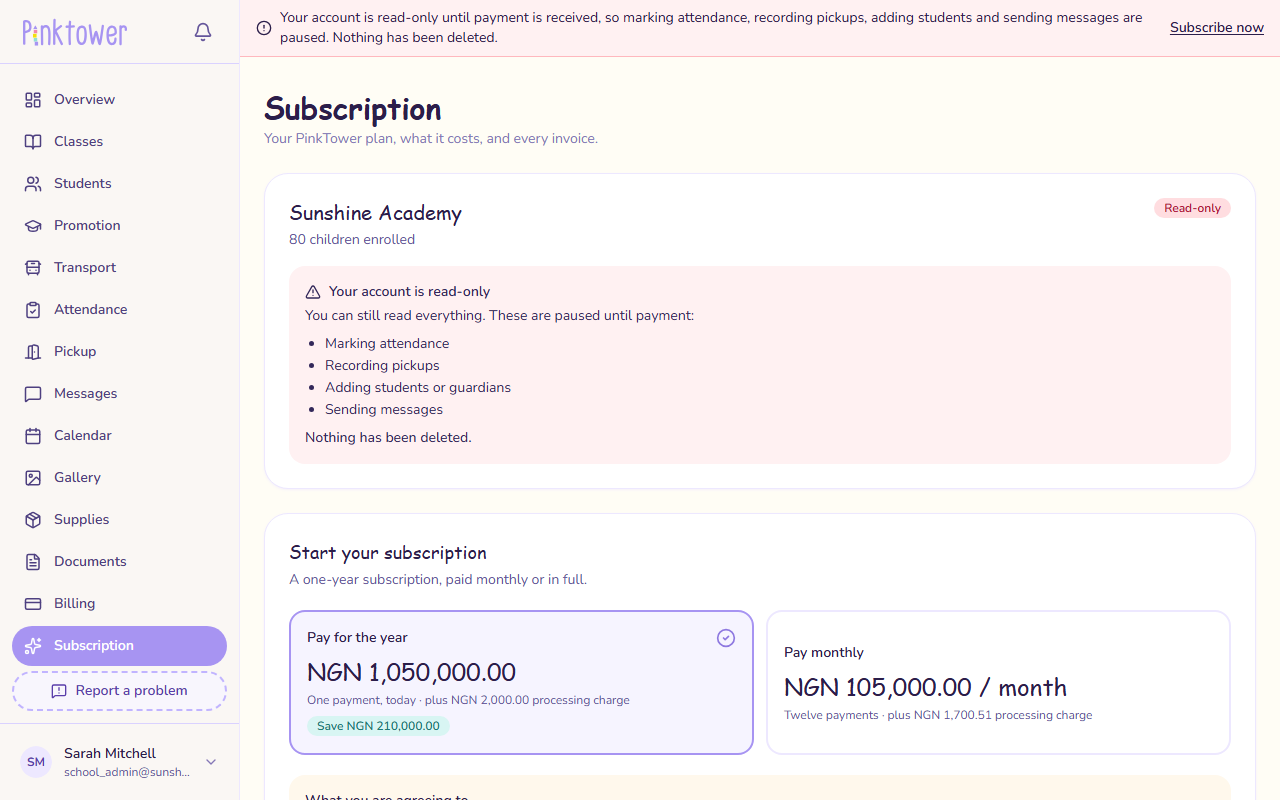
You can still read everything. Changes are paused until payment, including:
- marking attendance;
- recording pickups;
- adding students or guardians;
- sending messages.
A red banner on every page says your account is read-only.
These keep working:
- Reading everything: records, history, documents, receipts.
- Parents paying school fees. A family is never stopped from paying the school because the school owes PinkTower.
- The Subscription page, so you can subscribe or pay.
- Your school contact details on My Account, so PinkTower can reach you.
- Cancelling renewal.
Attendance and pickups stop too
Read-only includes marking attendance and recording pickups at the gate. Pay before your grace period ends so your staff are not caught out.
Getting out of read-only
- Your trial ended, or your subscription ended: subscribe from the Subscription page. Press Subscribe now on the banner to get there. See Subscribe.
- A payment is overdue: pay the overdue invoice. See Invoices. As soon as the payment goes through, your school can make changes again, with no waiting.
- PinkTower made your school read-only for another reason: contact PinkTower.
What parents see
Parents can still see everything about their children and can still pay their school fees. Some things the school does, such as sending messages, are paused until the school pays.
Access suspended
If PinkTower suspends your school's access entirely, signing in shows an Access suspended page instead of the app. Nothing has been deleted. See If your school's access is suspended.