Set up the school bus
Who can do this: Administrator
If your school runs buses, PinkTower lets the crew mark each child on and off the bus. Parents see where their child is, your dashboard counts who is on a bus, and children the bus drops at school are marked present automatically.
PinkTower does not track where the bus is. There is no map and no arrival time: it records what the crew mark.
Set the bus up from Transport in the sidebar, in this order:
- Add each bus.
- Give it a driver and a conductor.
- Choose who rides it.
- Set your run times.
Before you start, invite your drivers and conductors as Bus Driver and Bus Conductor. See Invite staff, nurses and bus crew. Make sure your terms are set up too: the bus only runs during a term. See Terms, fee types and amounts.
Add a bus
- Open Transport in the sidebar.
- Press Add bus.
- Enter a Name. A name that says where the bus goes, such as "Ikeja morning run", is more use to everyone than a number plate.
- Optionally, enter the Registration plate (optional).
- Choose a Driver and a Conductor. Both can be left until later.
- Press Add bus.
To change a bus's name, plate or crew later, press Edit on its card, make the change and press Save changes.
One person crews one bus
A driver or conductor can be on one bus only. Adding someone who already crews another bus is refused: take them off the other bus first. A bus card shows not assigned where a driver or conductor is still missing.
Choose who rides
- Press Who rides on the bus card.
- Search by name or class, and tick each child who rides this bus.
- Press Save roster.
A child rides one bus. Ticking a child who is already on another bus moves them to this one.
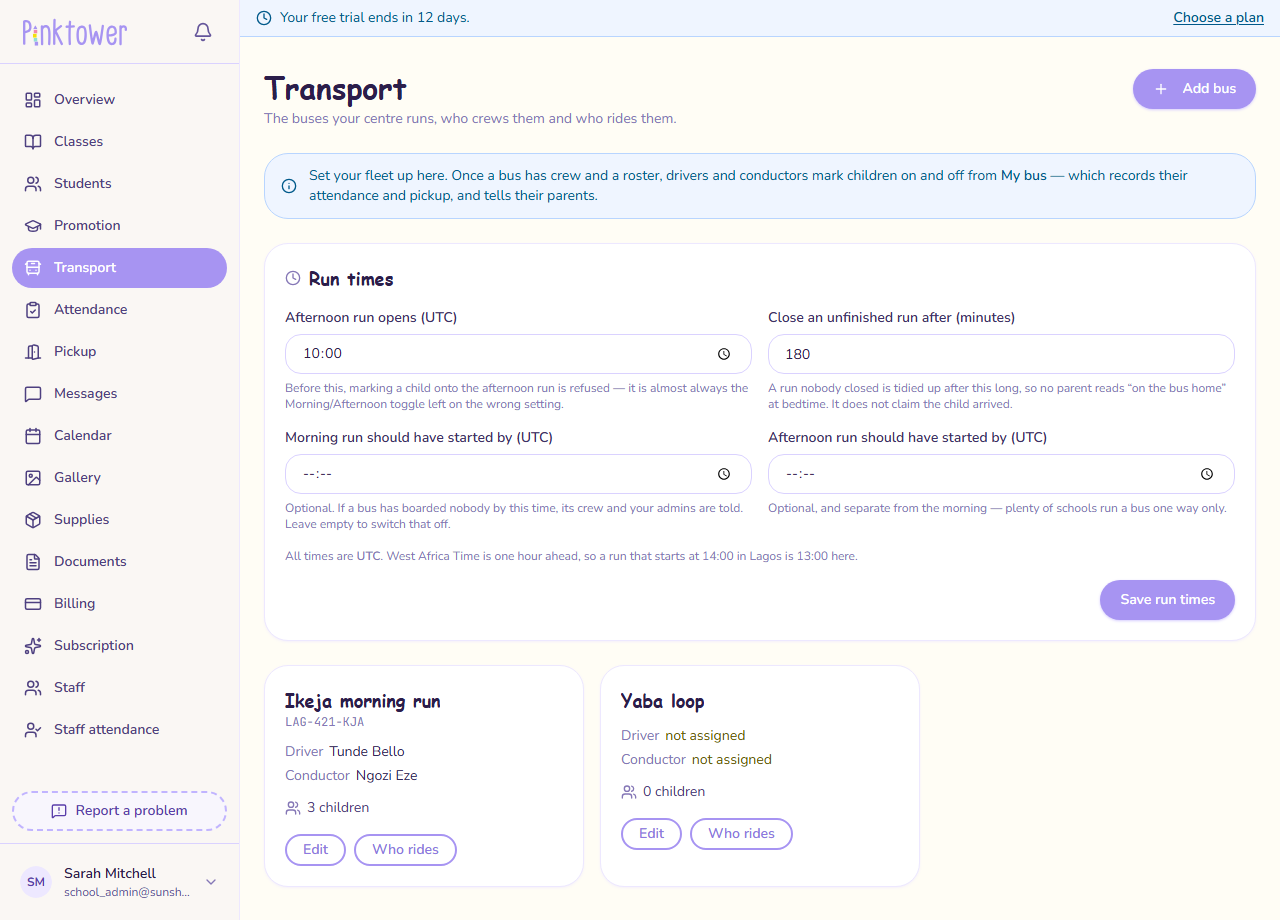
Set the run times
The Run times card on the Transport page has four settings:
| Setting | What it does |
|---|---|
| Afternoon run opens (UTC) | Before this time, marking a child onto the afternoon run is refused. It stops a conductor marking the whole bus as going home in the morning by mistake. |
| Close an unfinished run after (minutes) | A run nobody closed is closed automatically after this long, so no parent still reads "on the bus home" at bedtime. It does not claim the child arrived. |
| Morning run should have started by (UTC) | Optional. If nobody has boarded a bus by this time, its crew and your administrators are told. Leave it empty to switch this off. |
| Afternoon run should have started by (UTC) | Optional, and separate from the morning. Many schools run a bus one way only. |
Press Save run times when you are done.
This time is in UTC
PinkTower reads this time as UTC, not your local time. Nigeria (WAT) is one hour ahead of UTC, so subtract one hour: for 18:00 in Lagos, enter 17:00. See Times are in UTC.
Leave the start-by times empty at first
The two "should have started by" times are empty to begin with, so no alerts are sent. A time that is slightly wrong sends alerts about a bus that is running perfectly, and people soon learn to ignore them. Fill them in once you know when your runs really start.
What happens next
The crew use My bus to run each journey. See Run the morning and afternoon runs. The bus does not run at the weekend, outside term time or on a day you have closed the school; see When the bus does not run.